DivX Player plays AVI, MKV and MP4 video up to 4K
DivX Player is a free video player for Windows and Mac from DivX, LLC. It opens the common video formats, finds subtitles for you and comes with a converter in the same app. This independent guide shows you where to get DivX Player safely and how to use it well.
- FreeOptional paid Pro upgrade
- Windows and MacWindows 10 and 11, macOS
- Player and converterOne app from DivX, LLC
What DivX Player is
A video player with a long history, rebuilt as one modern application.
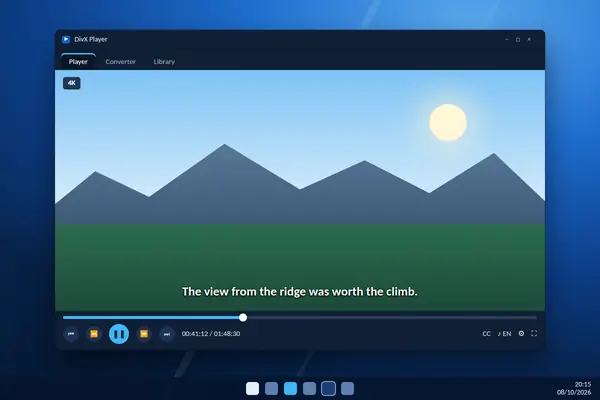
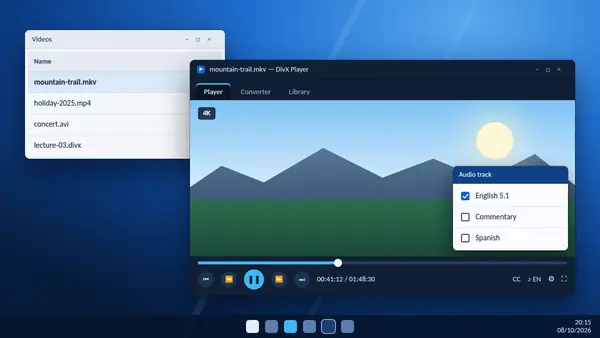
DivX Player is the playback part of DivX Software, a free application for Windows and Mac. It plays the video files most people have on their computers, including AVI, DIVX, MKV and MP4, at resolutions up to 4K. It also handles 360-degree video, multiple audio tracks, chapters and subtitles.
The software is published by DivX, LLC, a San Diego company whose video technology has been around for more than 25 years. The DivX name became well known for making high-quality video small enough to store and share, and it still appears on televisions, disc players and in-car systems that are certified to play the format.
With version 11 the publisher combined its separate tools into a single program. One download now gives you DivX Player, DivX Converter and a media library that keeps track of your videos. Moving a file from the library into the converter takes one click.
DivX Player is free. The free version shows adverts, and an optional paid upgrade called DivX Pro removes them and adds extra converter, cloud and audio features. You do not need Pro to watch video, search for subtitles or convert a file to MP4.
People usually look for DivX Player for one of three reasons: a video will not open in the player that came with the computer, a film needs subtitles, or a file has to be converted for a phone or television. This site covers each of those jobs step by step.
Made for the way you watch
From familiar file types to thoughtful playback controls, explore the details that make everyday viewing more enjoyable.
Flexible format playback
AVI, DIVX, MKV and MP4 support makes it easier to enjoy videos from different devices and collections.
Detailed picture quality
Enjoy crisp 4K footage and explore 360-degree videos with immersive, adjustable viewing angles.
Subtitles made personal
Choose subtitle languages and adjust the text appearance for a more comfortable watching experience.
Precise playback navigation
Preview scenes, revisit memorable moments and move through longer videos with greater control.
Soundtrack and chapter choice
Switch between available audio tracks or chapters while keeping your place in the video.
A more organised library
Keep favourite videos together in playlists and navigate a growing collection with less effort.
Useful video conversion
Prepare videos in MP4 or DivX formats for viewing and sharing across compatible devices.
Uncluttered viewing space
Enjoy a calmer viewing experience with unobtrusive controls that stay out of the picture.
How to use DivX Player
From download to your first film with subtitles in six steps.
Download the installer
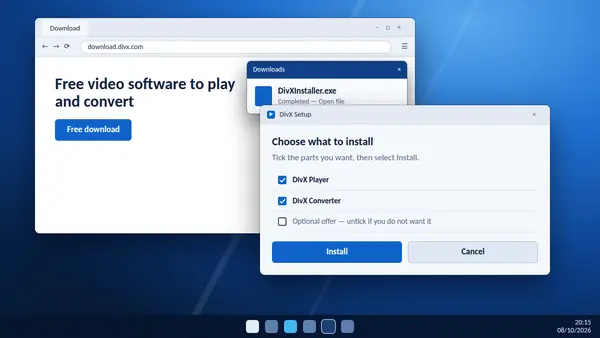
Use the download button for Windows or Mac on this page and wait for the installer file to finish downloading.
Install it
Open the file, allow it to run, accept the licence and choose the components. Decline any optional offer you do not want.
Open a video
Start DivX and drag a video onto the window. AVI, DIVX, MKV and MP4 files begin playing straight away.
Add subtitles
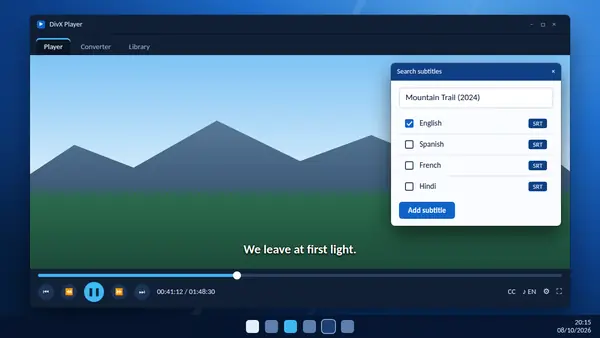
Open the subtitle menu, search by the full title, pick your language and add the result. Adjust the text size if you need to.
Move around the video
Hover over the playback bar for scene thumbnails, use chapters where the file has them, or fast-forward at up to 32 times speed.
Organise or convert
Group videos into playlists in the library, or send a file to the converter to make an MP4 for your phone or television.
The whole setup usually takes a few minutes, and most of that is the installer downloading its components. Nothing on this list needs the paid upgrade. If a step looks different on your screen, check that you have the latest version, because the layout was refreshed in DivX 11.
What DivX Player plays
The main formats, what each one is for and how DivX Player handles it.
- AVI
- The classic container for DivX video, still common in older collections and on certified disc players. In DivX Player: Plays in DivX Player on Windows and Mac.
- DIVX
- The publisher's own file type, built for DivX Certified televisions, players and in-car systems. In DivX Player: Plays in DivX Player and can be created with the converter.
- MKV
- A flexible container that can hold several audio tracks, subtitle tracks and chapters in one file. In DivX Player: Plays up to 4K, with track and chapter switching.
- MP4
- The format phones, tablets and websites prefer. In DivX Player: Plays in DivX Player and is the easiest target when converting.
- HEVC (H.265)
- A newer codec that gives high quality at a small file size. In DivX Player: Supported in the Windows version. Currently unavailable on Mac.
- 360-degree video
- Immersive footage that lets you look in any direction. In DivX Player: Drag with the mouse to pan around the scene.
One limit to know about: protected films bought through the DivX VOD service play only in DivX Software 11.0.1 and earlier. Current versions of DivX Player do not support that purchased content.
Download DivX Player
The buttons below start the download straight away. The installer comes directly from the DivX download server, so you always receive the newest release, and this site never hosts or changes it.
Your download has started. Open the DivX installer from your Downloads folder and follow the steps on screen.
Free to use, with no account needed to start. Your browser may ask you to confirm that you want to keep the file, which is normal for any installer. Check that the name is DivXInstaller, keep it, and open it when the download completes.
- File
- DivXInstaller (.exe or .dmg)
- Price
- Free, with adverts
- Works on
- Windows 10 and 11, Mac
- Publisher
- DivX, LLC
- Includes
- Player, converter and library
- Source
- Official DivX server
System requirements
What you need to run the current release of DivX Player.
- Windows
- Windows 10 or Windows 11
- Windows 7
- Use version 11.15 or earlier
- Mac
- DivX 11 for Mac
- Video formats
- AVI, DIVX, MKV and MP4
- Top resolution
- Up to 4K
- Internet
- For download, subtitles and updates
- Languages
- 10 interface languages
- Price
- Free with adverts. DivX Pro optional
Beginning with version 11.16, DivX Software no longer supports Windows 7 and needs Windows 10 or later. People on Windows 7 can keep using version 11.15 or earlier. On a Mac, HEVC video and HEIC photo support are currently unavailable.
The interface is available in English, French, German, Italian, Japanese, Korean, Brazilian Portuguese, Spanish, Simplified Chinese and Traditional Chinese. An internet connection is needed for the installer, the subtitle search and software updates, but not for playing files stored on your computer.
DivX Player free compared with DivX Pro
The free version covers everyday viewing. Here is what the paid upgrade changes.
| Feature | DivX Player (free) | DivX Pro |
|---|---|---|
| Play AVI, DIVX, MKV and MP4 up to 4K | Yes | Yes |
| Subtitle search in 50+ languages | Yes | Yes |
| Convert video to MP4 | Yes | Yes |
| Post to YouTube and Google Photos | Yes | Yes |
| Adverts in the program | Shown | None |
| Google Drive and Dropbox | No | Yes |
| Trim, crop and watermark | No | Yes |
| MPEG-2 and VC-1 conversion | No | Yes |
If you mainly watch videos and sometimes convert one, stay with the free DivX Player. Consider Pro if you convert often, want to trim clips before sharing, keep your collection in cloud storage or simply want the adverts gone. The upgrade unlocks features in the application you already have, so there is nothing to reinstall.
Get more from DivX Player
Six small habits that make everyday viewing smoother.
- Stay on the newest versionUpdates bring playback fixes and new controls. On Windows, DivX tells you when one is ready.
- Search subtitles by full titleVery short searches return an error. Type the whole title and choose a file that matches your video.
- Pin your favourite controlsKeep the playback bar minimal, or pin the buttons you reach for most often.
- Convert for small screensTurn a large MKV into a 1080p MP4 before copying it to a phone or tablet.
- Play from a fast drive4K files stutter from slow USB sticks and network shares. Copy them to an internal drive first.
- Use playlists for seriesPut episodes in order once and the next one starts when the last one ends.
DivX Player guides
Step-by-step help for the jobs people use DivX Player for most.
-
How to download and install DivX Player
From the download button to your first video: what each installer screen asks and what to choose.
Read full guide -
How to add subtitles in DivX Player
Search for subtitles by title, load a file of your own and change how the text looks on screen.
Read full guide -
How to play MKV files with DivX Player
Open MKV videos, switch audio tracks and subtitles, use chapters and smooth out stutter.
Read full guide
Questions about DivX Player
Short answers to what people ask before they install.
Is DivX Player free?
Yes. DivX Player is free to download and use. The free version shows adverts, and an optional paid upgrade called DivX Pro removes them and adds extra features.
Is DivX Player safe to install?
Yes, when the installer comes from DivX. The software is published by DivX, LLC, and the download buttons on this page link straight to the official DivX server. Read each installer screen and decline any optional offer you do not want.
Which versions of Windows does DivX Player support?
DivX Software 11.16 and later need Windows 10 or Windows 11. If you are still on Windows 7, you can use version 11.15 or earlier.
Does DivX Player work on a Mac?
Yes. DivX 11 is available for Mac as well as Windows. On the Mac version, HEVC video and HEIC photo support are currently unavailable.
Which video formats can DivX Player play?
DivX Player plays AVI, DIVX, MKV and MP4 files up to 4K, and 360-degree video. HEVC video is supported in the Windows version.
Can DivX Player play MKV files?
Yes. MKV files open directly, and you can switch between the audio tracks, subtitle tracks and chapters stored inside the file.
How do I add subtitles in DivX Player?
Open the subtitle menu and search by film or programme title. DivX Player finds subtitles in more than 50 languages from the OpenSubtitles.com database, and you can change the font, size and colour.
Can DivX Player convert videos to MP4?
Yes. The same application includes DivX Converter. Drag a video in, choose the MP4 preset and start the conversion.
What is the difference between DivX Player and DivX Software?
DivX Software is the name of the whole application. Since version 11 it is a single program that contains DivX Player, DivX Converter and a media library, so one download gives you all three.
How do I uninstall DivX Player?
On Windows, open Settings, go to Apps, then Installed apps, find DivX and choose Uninstall. On a Mac, follow the removal steps on the DivX support site.