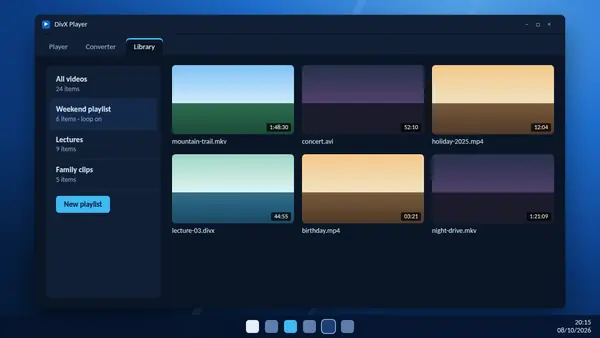
A folder full of files with cryptic names is hard to enjoy. The library inside DivX Software keeps track of your videos, shows them as thumbnails and lets you group them into playlists.
How the library fills up
The library keeps track of your videos. It also adds files automatically from your DivX Movies folder, so anything you save or move there appears without any extra steps.
To add videos stored elsewhere, drag the files or a whole folder into the library.
Find a video quickly
Each video is shown with a thumbnail image, both in the library and in search results, so you can recognise a file at a glance. Type part of a name into the search box to narrow a large collection.
Build a playlist
- Open the library and create a new playlist.
- Give it a clear name, such as a series title or "Friday film night".
- Select the videos you want. You can select several at once.
- Add them to the playlist and drag them into the order you prefer.
Play and loop
Start a playlist and the videos play one after another. Switch on loop to repeat the list, which suits music videos, background viewing or a display screen at an event.
Good uses for playlists
- Series: keep episodes in order and carry on where you stopped.
- Courses: group lecture recordings by subject.
- Family clips: collect short phone videos into one sitting.
- To watch: a simple queue of films you have not seen yet.
Send videos to the converter
Select a video in the library and use Send to Converter to turn it into MP4 or another format. With several videos selected you can prepare a whole batch for a phone or tablet in one go.
Keep the library tidy
- Rename files clearly before adding them. "Holiday-2025-beach.mp4" is easier to find than "VID_0042.mp4".
- Remove entries for videos you have deleted.
- Use one main folder for video. Scattered files are the main reason collections get messy.
What about streaming to a TV?
Older releases included DivX Media Server for sending video to devices on your home network. It was removed in version 11.16 to make the software lighter, and is only available in version 11.15 and earlier.